Disclosure: this page contains our MEXC referral link and code. If you sign up through it we may earn a commission at no extra cost to you. It never changes what we write. How we make money. Not financial advice.
12K4M5If you sign up with 12K4M5, MEXC may pay us a share of your trading fees (disclosure). The code doesn’t change deposit rules.
Key takeaways
- Pick the same network on MEXC and the sending platform.
- XRP, TON and ATOM also need a Memo or Tag.
- MEXC says crypto deposits are free; the sending platform charges its own fee.
- Each coin’s minimum is on the deposit page. Smaller deposits aren’t credited or refunded.
- Card and bank deposits need Advanced KYC.
- A US order against MEXC Global applies from December 10, 2026.
How do you deposit crypto on MEXC?
You generate a deposit address on MEXC and send coins to it from another wallet or exchange. A deposit address is the receiving address MEXC creates for one coin on one blockchain network. On the website, MEXC’s deposit guide gives the route: log in, open Wallets, choose Spot, then click Deposit. Next, you pick the coin and network, copy the address and paste it into the sending platform’s withdrawal screen. The sending platform pays the network fee, and MEXC credits the coins after enough confirmations. You can deposit to Spot or Futures, and MEXC says your pick becomes the default. For a first transfer, Spot is simpler, because nothing there faces futures liquidation. New to MEXC? Start with our sign-up guide and MEXC KYC guide.
Watch: How to Deposit on MEXC: Full Guide 2026 (Code 12K4M5)
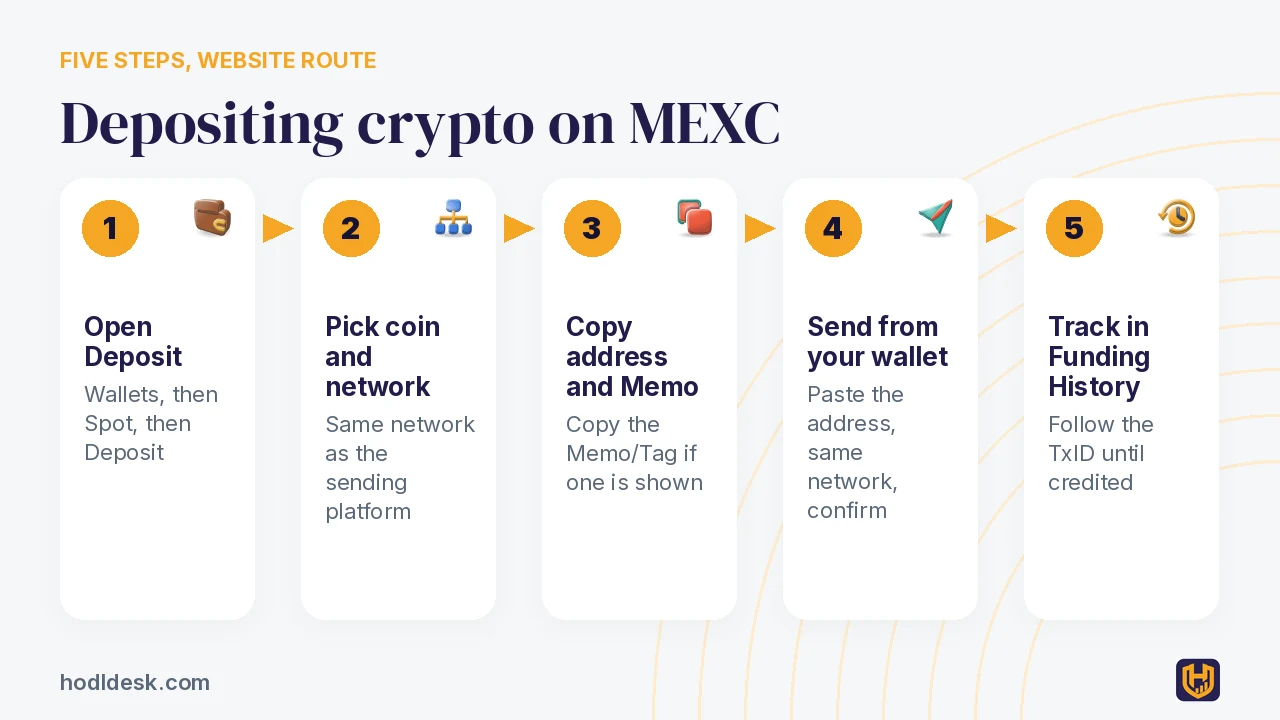
How to deposit on MEXC in five steps
Website route. In the app, start from Deposit on the home screen, then On-Chain Deposit (MEXC’s Learn guide says Wallets, then Deposit).
- Log in and open Deposit. On www.mexc.com, open Wallets, choose Spot, then click Deposit.
- Choose the coin and the network. Search for the coin, then select the network your sending platform will use.
- Copy the address and any Memo/Tag. Copy the address exactly. If MEXC shows a Memo or Tag, copy that too.
- Send from your other wallet or exchange. Paste the address, choose the same network, enter the amount and confirm.
- Track the deposit in Funding History. Follow the TxID under Wallets, Funding History, Deposit until it shows as credited.
Which network should you choose for a MEXC deposit?
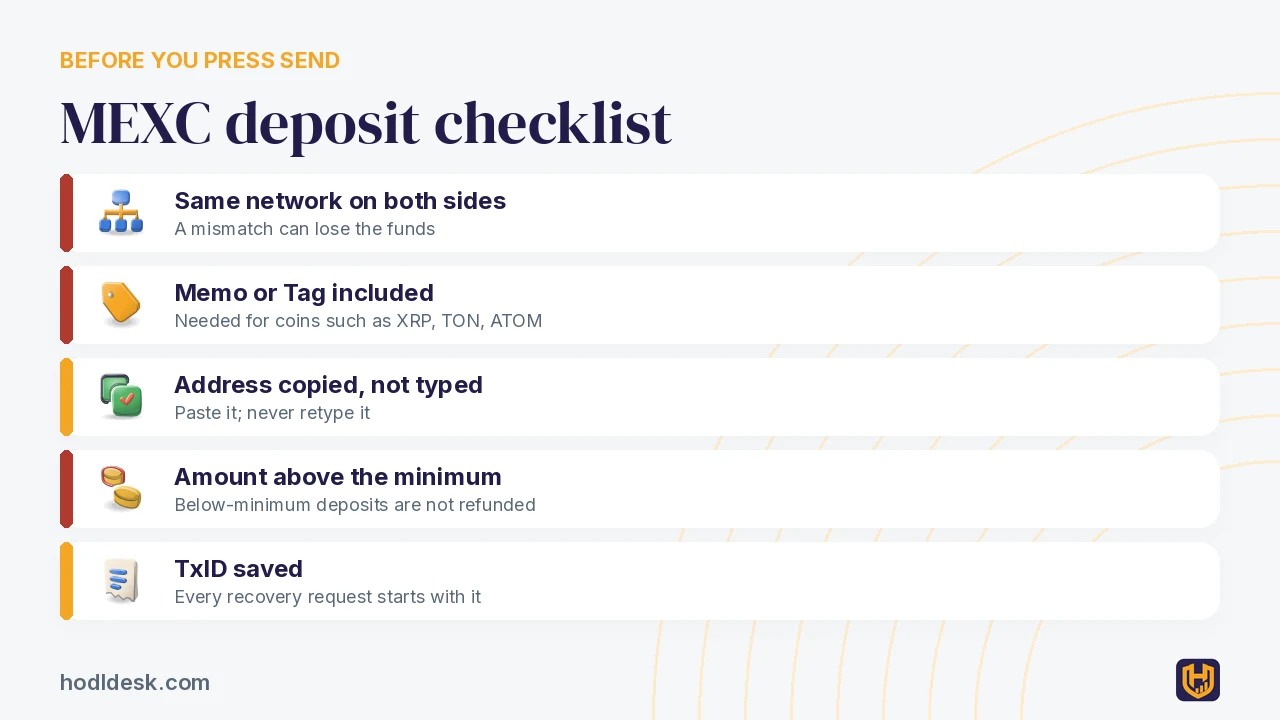
Choose a network your sending platform supports, and select it on both sides. A network is the blockchain a coin travels on: USDT, for example, exists on several, such as TRON, Ethereum or BNB Smart Chain. MEXC’s app guide states that “The deposit network must be exactly the same as the withdrawal network”. Otherwise, the coins land on a chain where your MEXC address can’t see them. Network fees also differ, so pick the cheapest network both sides support. Avoid sending through a smart contract call. MEXC’s app guide warns that “Deposits made via contract transfers may fail to be credited”. Similarly, a token’s contract address must match MEXC’s. If you send a small test first (a common precaution, not a MEXC rule), make it larger than the coin’s minimum plus the sending fee, or it won’t be credited.
What is a Memo or Tag, and when do you need one?
A Memo or Tag is a short extra code that tells MEXC which account a deposit belongs to on networks where one address can serve many accounts. MEXC’s Learn guide names XRP, TON and ATOM, and its website guide adds EOS. If the deposit page shows a Memo/Tag field, copy it into the sending platform’s memo field exactly. MEXC says a missing or wrong Memo/Tag “stops the deposit from being credited automatically”. Fixing it takes a paid recovery application.
What is the MEXC minimum deposit?
There isn’t one account-wide number. Instead, MEXC sets a minimum per coin and per network. Its Learn guide says the minimum and required confirmations “appear on the deposit page after you choose a network”. The key rule is blunt: “A deposit below the coin’s minimum is not credited and cannot be refunded”. Check the minimum on your own screen before sending. The sending platform also deducts its fee first, which can leave an exact-minimum transfer short. We found no flat figure such as “1 USDT” on MEXC’s own pages. Fiat routes differ; for example, MEXC’s buying guide gives 30 to 12,000 USD per third-party purchase.
Does MEXC charge a deposit fee?
For crypto, MEXC says no. Its zero-fee page says “All crypto deposits on MEXC are free”. However, the wallet or exchange you send from charges its own withdrawal or network fee. One exception: MEXC deducts a consolidation fee on LUNC and USTC deposits. MEXC also says it adds no service fee on bank transfers, though your own bank may charge one. Its USD page lists “0 Fees on USD deposits until further notice”, though bank SWIFT fees can still apply.
How long does a MEXC deposit take?
It depends on the network; MEXC gives no fixed time. A network confirmation is a block added on top of your transaction, and MEXC waits for a set number before crediting. MEXC’s Learn guide says that number shows under “Expected Arrival” on the web and “Network confirmations” in the app. Its app guide says crediting takes “a few minutes to longer during periods of congestion”. Crediting happens in two stages: a pre-credited deposit can be traded but not withdrawn, and a fully credited one can be withdrawn too. However, MEXC’s pages differ on the first stage. The Learn guide says pre-credited funds can’t be transferred, while its crypto deposit explainer allows internal transfers. Wait for full credit before moving coins. Keep the transaction hash (TxID) from the sending platform; every fix starts with it.
Can you deposit on MEXC with a card, bank transfer or P2P?
Yes, in supported regions. MEXC’s buying guide lists local bank transfers in currencies including EUR, BRL, COP, MXN, CLP, PEN and ARS. It also lists cards, Apple Pay, Google Pay and third-party channels, with card limits of 5,000 USD per transaction and 10,000 USD per day. That guide says “All fiat deposits and cryptocurrency purchases require the completion of Advanced KYC”. MEXC’s USD page offers SWIFT only, requires the bank name to match your KYC name, and doesn’t list the United States as eligible. P2P is buying crypto from another user, with the seller’s coins in platform escrow until payment is confirmed; MEXC says Primary KYC is enough for it. For crypto, MEXC’s KYC FAQ lists deposits as unlimited at both levels. Notably, MEXC contradicts itself on card fees. The buying guide says “MEXC does not charge purchase service fees”, while a June 2026 Learn article says “A charge of approximately 2% fee is applied”. Coverage differs too: “over 200 countries” in one, 38 countries in the other. Check the fee on the confirmation screen before you pay.
| Route | KYC | MEXC fee | Limits MEXC lists |
|---|---|---|---|
| Crypto on-chain | Unlimited at both levels | Free | Per-coin minimum |
| Local bank transfer | Advanced | None added | Not stated |
| USD via SWIFT | Advanced | 0 until further notice | USD 20,000 a day |
| Card | Advanced | None vs about 2% | 5,000 USD per order |
| P2P | Primary | Not stated | Set by each ad |
What does the FinCEN order mean for MEXC deposits?
From December 10, 2026, it bars US financial institutions from moving funds to or from MEXC Global; the money-laundering finding behind it is Treasury’s allegation. On November 6, 2026, the US Treasury said FinCEN had issued an order “effectively cutting off MEXC Global’s access to the U.S. financial system”. It calls MEXC Global “of primary money laundering concern in connection with Russian illicit finance”. In our reading, that would cover card payments and bank transfers that pass through US institutions. MEXC’s November 7 statement says it takes the concerns “seriously”, has begun “an independent review of our AML and sanctions controls”, and is “operating normally, and user assets remain secure”. Meanwhile, Decrypt reported on November 10 that Binance had stopped processing transactions involving MEXC, effective immediately. Our sign-up guide has more. When I checked the Federal Register on November 26, 2026, I found the notice listed as 91 FR 72420, published November 10, with an effective date of December 10, 2026.
The US is also one of 17 Prohibited Jurisdictions in MEXC’s User Agreement (November 12, 2026), with the UK, Canada and others. Don’t use a VPN.
What if your MEXC deposit has not arrived?
Start with the TxID on a blockchain explorer: check whether the transaction has all its confirmations. If it’s still confirming, wait and track it under Wallets, Funding History, Deposit. Next, check whether MEXC has that coin’s deposit channel under maintenance; if so, wait for it to reopen. If the explorer shows the transfer complete but MEXC shows no record, MEXC’s Learn guide says to submit an Uncredited Deposit Return Application. The same form covers a wrong network, a missing Memo/Tag and an unsupported smart contract. However, if the blockchain shows the transfer failed, contact the platform you sent from instead. The US FTC warns that if your crypto is lost or stolen, “no one can step in to help you recover your funds”, so treat paid “recovery” offers as scams.
What if you sent on the wrong network or forgot the Memo?
Apply quickly, and expect a fee with no promise of success. The form asks for the token, network, amount, MEXC receiving address and the TxID. The fee is frozen from your Spot USDT when you submit, deducted only if the return succeeds and released if it fails. Consequently, keep enough USDT in Spot. For hot-wallet and missing-Memo cases, MEXC returns the funds only to the original sending address rather than crediting them, so if you sent from an exchange, ask it whether it can receive a return. However, MEXC’s pages conflict on the wrong-network case. Its November 13 guide accepts applications without promising recovery. When I opened MEXC’s October 12, 2026 website deposit guide on November 26, I found it still says wrong-network funds “will not be recoverable”. MEXC says it reviews an application within 1 to 2 business days, longer for hard cases; the form guide’s table then gives the full processing time for each case. The FTC says crypto payments “typically are not reversible”, so the check before sending matters most.
| Case | Fee (USDT) | Processing time |
|---|---|---|
| Missing or incorrect memo | 20 | 7 days |
| Sent to a hot wallet | 20 | 7 days |
| Unsupported token or network | 20 | 21 days |
| Supported, not yet credited | Free | 3 days |
Our verdict on depositing on MEXC
Crypto deposits on MEXC are simple and, on MEXC’s side, free. The risk sits in three fields: network, address and Memo/Tag. Match the network, copy the Memo, check the minimum and keep your TxID. Fiat needs Advanced KYC; moreover, US bank and card rails face the FinCEN order from December 10, 2026. Deposit tasks for the welcome offer are in our MEXC sign-up bonus guide.
How we checked: every MEXC rule here comes from MEXC’s own pages, and the US rules from Treasury, the Federal Register and the FTC, all opened November 26, 2026; the Binance line is Decrypt’s report. Lucía Ferrer re-checks the numbers under our editorial policy. Read about HodlDesk, our risk disclaimer or the Getting Started hub. When you’re ready, you can open MEXC with code 12K4M5. Our upcoming guides cover trading and withdrawals.
Watch: How to Deposit on MEXC: Beginner Tutorial 2026 (Code 12K4M5)
FAQ
How do you deposit crypto on MEXC?
Log in, open Wallets, then Spot, then Deposit. Choose the coin and network, copy the address and any Memo/Tag, and send on the same network.
What is the minimum deposit on MEXC?
There is no single minimum. Each coin and network has its own, shown on the deposit page. Smaller deposits are not credited or refunded.
Does MEXC charge a deposit fee?
MEXC says crypto deposits are free. The platform you send from charges its own fee, and LUNC and USTC carry a consolidation fee.
How long does a MEXC deposit take?
It depends on the network. The deposit page shows the confirmations needed, and congestion can slow crediting.
What happens if I deposit on the wrong network?
The funds may be lost. Submit an Uncredited Deposit Return Application quickly. MEXC can’t promise recovery, and a fee applies if it succeeds.
What if I forgot the Memo or Tag?
The deposit won’t be credited automatically. Apply through MEXC’s recovery form; its fee table lists 20 USDT and 7 days, with the funds returned to the original sending address.
Can I deposit on MEXC with a card or bank transfer?
Yes, in supported regions, after Advanced KYC. MEXC lists cards, local bank transfers, USD via SWIFT and third-party channels.
Can I deposit on MEXC without KYC?
Fiat deposits need Advanced KYC. For crypto, MEXC says skipping KYC may affect deposits, depending on region, so verify first.
Can I deposit to MEXC from Binance?
Check first. Decrypt reported on November 10, 2026 that Binance had stopped processing transfers to MEXC, effective immediately.

Rafael Moreno, Founder & Lead Writer
Rafael Moreno spent seven years as a payments and treasury analyst at a fintech, working on FX, settlement and stablecoin rails. He has held crypto since 2017 and used MEXC since 2022. He writes plain-English MEXC guides and reads the fine print first.

Fact-checked by Lucía Ferrer, Research & Fact-Check Editor. Every number is checked against MEXC’s own pages. Our editorial policy